Bluink Key Enterprise4.14.2
Publisher Description
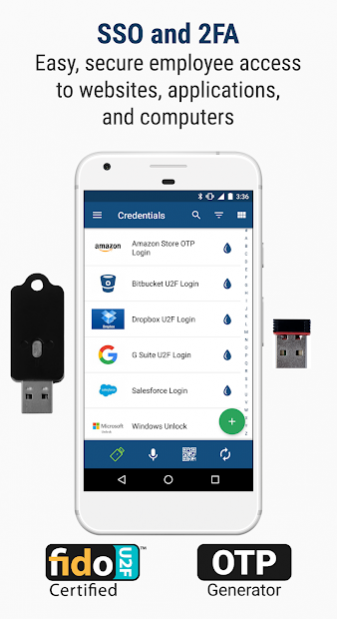
Bluink Enterprise is a strong authentication and simple sign on application for organizations. Bluink Enterprise is based on the Bluink Key app which turns any smartphone into a universal authenticator that can log you into anything. You can forget your passwords and let Bluink log you into anything effortlessly. Protect yourself from identity theft by using strong, random passwords, or one time passwords. Use Bluink to keep your digital identities safe and encrypted.
Note: You must have an account with an organization that has deployed a Bluink Enterprise server.
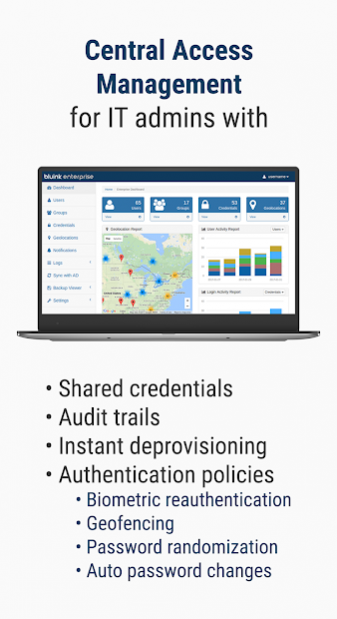
Bluink Enterprise allows organizations to centrally manage credentials and policies that employees use to login to corporate systems. Some enterprise policies include:
-automatic password changes
-strong authentication (2 factor with optional biometrics)
-geo-fencing
-group sharing of credentials
-synchronization of credentials among multiple phones
Employees can also use Bluink Enterprise for their own personal credentials that are not visible by the employer.
By letting Bluink randomize your static passwords, you can make your basic authentication as strong as possible and your identity safe from online attacks on password databases.
Bluink can generate codes for both Time-based One Time Passwords (TOTP) and HMAC-based One Time Passwords (HOTP) for supporting websites and VPNs. Registration of secret keys in KeyURIFormat can be done with a QR code scan.
Bluink is also a FIDO U2F (Universal Second Factor) authenticator. It allows your smartphone to be registered as a U2F authenticator for participating sites and will perform strong public key authentication with keys generated and securely stored on the phone.
Authenticate to Anything:
Because no software is required, Bluink will work with any existing system, whether it is a computer login, a website, or even unlocking a full-disk encryption system at pre-boot.
Strong Protection:
Unlike other password managers, Bluink does not store your personal information in the cloud, on servers or computers. Instead, your sensitive information is with you all the time on your smartphone and protected with industry standard AES 256 bit encryption. You need your smartphone and the master password for the Bluink app to access credentials.
Direct Connection to Computer:
Using the Bluink Key, your smartphone makes a direct, wireless connection with the computer and information is sent over an encrypted, mutually authenticated channel.
Automation:
Logins can be automated with custom wizards. Entire sequences of usernames, passwords, OTP, or other credential items can be accessed with a single tap. Optionally, by using our free Bluink browser extensions logging into a website can be done by scanning a QR code. Single-tap automated logins will work for just about any system including Windows 7 /8, Mac OS/X, Linux, Full Disk Encryption, and websites.
Keyboard and Mouse Functions:
When used with a Bluink Key, this app turns your phone into a computer keyboard and mouse for your PC, Mac, tablets, and even smart televisions. With a touch of your finger you can automatically use any piece of personal information on the computer whenever you need it. Now you can surf the web while reclining, give presentations, or navigate your smart TV using your smartphone.
Manage any kind of credential:
In addition to static passwords, one-time passwords, and private keys, Bluink will let you manage any piece of personal identifying information including user IDs, credit card numbers, bank accounts, phone numbers, etc. If you can write it down, Bluink can manage it and make it available for you to use whenever it is needed.
About Bluink Key Enterprise
The company that develops Bluink Key Enterprise is Bluink Ltd.. The latest version released by its developer is 4.14.2.
To install Bluink Key Enterprise on your Android device, just click the green Continue To App button above to start the installation process. The app is listed on our website since 2020-11-23 and was downloaded 3 times. We have already checked if the download link is safe, however for your own protection we recommend that you scan the downloaded app with your antivirus. Your antivirus may detect the Bluink Key Enterprise as malware as malware if the download link to ca.Bluink.Injector.Enterprise is broken.
How to install Bluink Key Enterprise on your Android device:
- Click on the Continue To App button on our website. This will redirect you to Google Play.
- Once the Bluink Key Enterprise is shown in the Google Play listing of your Android device, you can start its download and installation. Tap on the Install button located below the search bar and to the right of the app icon.
- A pop-up window with the permissions required by Bluink Key Enterprise will be shown. Click on Accept to continue the process.
- Bluink Key Enterprise will be downloaded onto your device, displaying a progress. Once the download completes, the installation will start and you'll get a notification after the installation is finished.
Program Details
System requirements
Download information
Pricing
Version History
version 4.14.2
posted on 2020-11-23
- Fix bugs
version 4.14.1
posted on 2020-06-26
- Certificate update
- Improvements to dialog/messaging
version 4.13.7
posted on 2019-09-13
- Fix bluetooth crash
version 4.11.0
posted on 2018-02-06
https://dynalist.io/d/o7pmv6VJa56ZYDBB6i-byM1n#z=2jD6lbTgt5Ru68R01J9GRdtZ
version 3.2.5
posted on 2016-11-23
https://workflowy.com/s/nZFz44Ca26
